Recently I got a complement/comment posted to an older blog entry “Converting CAD Details To Revit Details: Just Do It...One way or another.” where it was said: "Great in-depth post on this difficult process. Well written, not confusing for anyone of any skill level. I work with the McGraw Hill Sweets Network, an online database where you can find all your cad detail needs." Well I do like a lot of the items on the Sweet’s sites (especially the BIM objects to be found there!!!) and think the publisher is doing great work for our industry without a doubt; but I want to make a distinction between what we NEED in BIM projects as opposed to CAD projects... Cad detail needs are not at all similar to BIM detail needs and it is just an error of imagination to confuse the two... an understandable error but error nonetheless (in most cases).
CAD detail are obviously good for CAD work flows but not for BIM projects as a whole. Basically CAD details are lines, arcs , circles & text (all dumb objects and merely belief based) …we (read as I) need to revisit the whole concept of detailing in Revit in the hopes of shedding more light on how it may be best to work WITH BIM, rather than against the river that it is.
I have become an overwhelming advocate against the use of CAD details in Revit at all; if one can possibly help it. Then I have extended this to drawing lines in Revit...
I would like to forward the following postulate to those who have details drawn in Revit using lines, arcs, circles & text and still think that they have Revit details: you have not much more than sticky back details (yes, I have seen Revit details where nothing more is technically needed and in those cases I might agree that lines can be used... I just don't.
I'd still personally make the items into detail components, in case I ever use it again elsewhere -like the handicap symbol... and especially if the items use CAD lines that were "Revitized... that usually (read as most always) converts smooth curves into billion-segmented line nib-lets, creating bloated and slower files and worse than that hundreds or thousands of the ill-desired and dreaded Warnings. YUK:
From Toward a Zen of Revit: No Warning is a Good Warning (I am writing that presently)
Bottom line: details using lines, arcs, circles & text are not as close to being as powerful as they can be with a true Revit (AKA: BIM) efficient work flow: (remember that was why you bought Revit wasn't it? The associative power & efficiency? Or was it that your client forced it on you???)
Next I propose a challenge: NEVER, EVER, EVER USE LINES IN REVIT.
Especially those lines converted from CAD files or details, as discussed previously... even though I gave that as an option in that older post...can't life be fickle? ...I said that was an option...it is just a bad one for long term practice).
I understand that most offices have hundreds of standard details or typical details that are used as starting points… With that in mind I do suggest recreating (yep, recreate) all of the existing, appropriate details in Revit, using only (OK; mostly only) Detail Components for items that will be called out and specified... then I suggest using Keynotes and Tags instead of text in as many cases as can be!!!
From Toward a Zen of Revit: No Text = No Chasing
Dogmatic? Yes
Makes Details & Projects better? Yes
Saves time in the long run? I have found
Tastes great? Huh?
Using Detail Components (for every item) can be more possible than you might think right now... be creative!!!
OK onto those details sans lines...
I am not talking about lines within 'sketch modes' etc. either; in fact the detail component that we will be creating in this posting will ultimately use a line (though at the family level, so it doesn't count)… So I make a rule and break the rule… The logic there is When the line is used to make a detail component, it may work and look like a simple line but it has become far more than that... it becomes a Data Enlightened Object.
What I mean is: do not (in almost every case) use lines for pieces of Revit details, such as the example herein, where a waterproofing membrane (image 1) is specified.
-I even create or use Detail Components for standard/generically specified items such as “FINISH FLOOR PER PLANS”, etc… Oh and YES, the wall below would NOT have the waterproofing membrane on the exterior of finish... I merely used it as an example about these detail components!!!
In the stead of using lines and pointing to them with dumb (read as not associative) text I suggest using “Line Based Detail Components” or Detail Component line based” (Image 2), as the family template is so named. Unless of course you want to chase text and naming around all of your details… hey; maybe I am wrong about this and you make so much money that spending time or wasting time is of no consequence… If that is you then draw lines and link in CAD details and have fun with all the inconsistencies (CAD dimensions & arrows, etc.), time lost to re-re-re-modification and finally project slow down (too many CAD files will create a situation where Revit seems to work like it’s in molasses!!! Or like a Fucking Stupid Donkey)
The procedures to ‘draw’ with these Line Based Detail Components once in a project are similar to pulling lines around; with a few main differences:
1) We cannot chain line based components together (awww ) , so click away my pretties
2) Detail Components can be brilliant!!! If we change one in a detail all the other instances will change… thus we leverage The Power of BIM: Change it once and it changes everywhere!!!
The following should all be clear if you have some pre-existing understanding of Family Creation. Uhhh; Revit Family Creation that is...
Making a Line Based Detail Component
1) Using the Big “R”, at the top/left of Revit (AKA: the Application Button) choose the flyout arrow next to NEW, then choose FAMILY
2) Select the Detail Component line based template (Image 2)
3) Create a line in the new family
-there, I said it… my rule is technically broken if you are thinking how I usually think...though in this case I am not being that literal (ahh, the contradictions of communication)
4) Lock it to the REF PLANES (Image 3)
5) Flex the length
If all is working then move on, if not try again…
6) Save the family. (use a good naming convention & library location, right? But you knew that…)
OK ready for the proof? Here we go…
These 4 details (Image 4) are the same, right? Wrong… one uses 'them there' dumb lines, the others use a Detail Component of the line based variety… But you knew that (by now)…
Now, I am going to change the Detail Components from being "Bituminous Sheet Waterproofing" to "6 Mil. Polyethylene"...
Can you guess which one of them won’t change when the meta-data (Keynote value, in this case) is changed? … I’ll wait… OK, see (Image 5) for the answer.
Now extrapolate this type of change out to the multitude of components in the numerous details you may have and you can probably see the benefit of taking a little extra time up-front to primarily FIND and secondarily, Create your Detail Components (line based or otherwise), AS DETAIL COMPONENTS for every (or as close to every) specific case necessary… BTW: Have you ever looked to see how many detail components there are in the OOTB Revit library, let alone floating around on the web-o-sphere??? There are A LOT!!!
Happy Detailing!!!
A BIM Junkies Guide to Getting Over an Addiction to Lines..."Toward a Zen of BIM"
Thursday, July 08, 2010
Wednesday, July 07, 2010
TwitchINg Clouds
Simply hit the link via the above image and get Twitching (Using ADSK Software without installing them)!!! bandwidth withstanding...We can lead technology but only if we participate!!! Get to it!!! The Labs have getting started videos as well... Unfortunately for our international friends these are just for the USA and Canada at present...damned treaties???
Thursday, July 01, 2010
AutoCAD's just Religion
"Change The Words" [read in the cadence of a blues song]AutoCAD's a religion
It's just belief system; yeah
-draw two lines and hatch in between them
now point to it with some text
that's what you have now: i'n't it?
but that's just what you believe...
' don't trust me? just change the words,
what does it now mean
If your belief in the object
fails or breaks down
you're back to just lines again: text and hatch
"I believe what I want to believe"; don't trust what you believe
Things are just what they are, they are
no alterations apply
It's just what you believe, no one's gonna change you yourself
you have to embrace change, that's the only thing that remain( )
Change Remains but Belief is Fleeting
Construct a Future and Use New Idea( )
AutoCAD's a religion, BIM is one too
The difference as it seems to me; blind faith and dogma
you can have what you want, you want
but is it really YOU who want( )?
Thursday, June 17, 2010
Kill BIM!!! and other USC Symposia this Summer

In my BIM travels I have had the honor of being a guest lecturer in Karen Kensek's classes at the USC School of Architecture. So to help get the word out for some events this summer I am happy to share these with you all... though if you are in or around the Los Angeles area it may be more applicable...Prof. Karen Kensek is putting on The Fourth Annual USC Symposium on Building Information Modeling + Analytics Plus: Karen, along with Dr. David Gerber; also from the USC School of Architecture; are putting on LA: Kill BIM (BIM for a transforming profession)... you can find information and links for registration by clicking the 2 images above...
Thursday, June 10, 2010
Analyze This!!! The effects of solar radiation from The Labs
Well, if you ever wanted to "Analyze the effects of solar radiation on various surfaces of your conceptual building model." right from Revit, then check out The Lab's newest Tech Preview video (for Revit) and click the link below the vid to get your own!!! This one's mine :-)
P.S. There are larger videos available from the link as well... Cheers
Sunday, June 06, 2010
Architecture Needs More Creativity and Less Boredom
BTW: I used these images since a friend and I traveled to Rotterdam (during a trip to Amsterdam & England, in the ...well, a long time ago), just to see these buildings.
We had a great time (as far as I can remember)!!! The Lesbian bars there are great in Europe (a friend and I were in our 20's and kept finding bars full of women (YAAY!!!)... then we found out that we were in 'foreign' territory (read as: Lesbian Bars) ...damn and no-one bought us drinks... or did they??? I guess since I don't recall all of those years they probably did get us drinks... and most likely kicked our asses too...
Anyhow, once we traversed some 2-way roads (in a nearby village) that can only fit one car, in any direction at any one time (yes, that's what I said) we got to the 'Kubus woningen' and were lucky enough to get into a few of them... Fucking brilliant work!!! Views looking both up and down... Very good vibe...
Editorial Alert!!!
We need more individual expressions of creativity (especially in Architecture) since these types of buildings are still thought of as odd... THEY ARE NOT ODD!!! too many people are simply too boring!!!
Wednesday, June 02, 2010
SWEETS & Revit...Sweet!!!
There are more than the OOTB families 'out there', as we have discussed herein and elsewhere around the Blogosphere and by clicking the image above you will find 50 or so of these manufactures that provide Revit Content... just for YOU!!! OK, me too!!!Be sure to check in on Bim.Construction.Com to find more from the McGraw Hill Construction family of publications.
Tuesday, May 25, 2010
What's the best computer to buy for Revit 2011?
That question is also asked as: WTF computer do we buy for Revit 2011???
I have gotten that question so much and expect it more so here goes... If you want to know what computers the experts recommend to buy for Revit 2011 I'd suggest the following as guidelines... As to manufacturers, that is more personal and let's not get personal here :-)
My recommendations:
OS = 64bit Mandatory
RAM = 16 GB Recommended; 8 GB Bare Minimum
Processors = Dual 6 Core Xeon Get the job done fast...-OK Dual Quad Xeons are OK too...
Video Card = 1TB, (I meant GB...Doh) If it's on the list below
Screens = Two 24" flat panels (Yes 2 monitors for everyone!!! even for support staff, etc... this boosts productivity 20 to 50 percent!!!)
Workstations: Autodesk Revit Architecture System Requirements
Use the ADSK recommendations above and consider them as a baseline for your options... meaning if you can afford more then you should get more; how much more? As much as your budget limits allow... Do I want to have this machine for more than a year (or two if we're lucky)? That is always the question I ask myself; because software is always pushing computers, not the other way around.
Video Cards: Graphics Hardware List
Get the "Supported, Recommended" video cards or choose others at your own risk.
SURF ABOUT IN THE NUMEROUS ADSK DISCUSSION GROUPS or THE AUGI FORUMS to see (or actually search for) even more...
Friday, May 21, 2010
For all my (Structural) Friends...

The Revit Factory is surely busy and one of the great resources is The Revit Clinic... By clicking the image above you will get to a Structural specific posting regarding beam cutbacks, that many will find useful... That is if they use Revit Structure... Don't forget to surf the links therein...Revit Architecture & MEP users/abusers will likewise find many many many postings there that will prove extremely valuable, so "word to the wise...".
Another resource for Revit Structure-ers is the book: Mastering Revit Structure 2010, by Thomas S. Weir, Jamie D. Richardson, David J. Harrington The 2011 book will be out soon, I hear... (Update: See the comment section below this post... sad faces all around, as no 2011 book is planned... 2010 book will suffice for 99.875% of 2011 learning needs though...)
BTW: If you are in LA and come to one of our LARUGs, I am sure we can get him to autograph your copy, (as Tom and I are Co-Chairs I may have pull :-)
Tuesday, May 18, 2010
AU and a cloud... Voting ends Friday, May 21
Below are the courses that I am hopeful of presenting at this year's AU 2010... wanna help (me)??? You can, if you can!!! Login to the Autodesk University Speaker Voting page(s) (HERE) Search for Jay Zallan under keywords or speaker... shameless, I know... anyhow; you will find the following courses that as elluded to, I have proposed ...and know will be kick ass courses!!!- From Programming to Presentation: Planning With Autodesk® Revit®Architecture
- Functional Family Creation with Autodesk® Revit®
Thanks to all who already have voted on these; every bit of support helps and is greatly appreciated Plus the favor has been returned!!! )or will be)...
CU @ AU N LV
BTW: I am not making a shooting motion in the photo...perhaps...
Monday, May 10, 2010
WAFS not WTF's ...Globalize This!!!
Global (or at least multiple office) Revit Collaboration without FTP-ing files back and forth???
Getting possible finally!!!
Click the image above to play the video
Then Go To This Revit OpEd post to learn more...Steve, You're the man!!!
Getting possible finally!!!
Click the image above to play the videoThen Go To This Revit OpEd post to learn more...Steve, You're the man!!!
Friday, May 07, 2010
When Green goes Bad
Living Buildings: a dying breed already???!!!
Perhaps Black IS the new Green... Though I believe Black is the new Black.
The Image links to the full article ...so click it!!! FYI: I forgot to publish this a few months back... good thing the green fad hasn't died like this building's wall yet.
I say 'fad' & 'yet' because many people (including many in AEC) bandy about "green" (to get business perhaps), yet are themselves very unsustainable... Are the lights, computers, monitors in your firm off overnight??? Are you somewhere mostly sunny and yet have no solar panels??? Etc, etc, etc... We all need to get our Green Shit together. Hmmm Brown; the New Green...
Perhaps Black IS the new Green... Though I believe Black is the new Black.
The Image links to the full article ...so click it!!! FYI: I forgot to publish this a few months back... good thing the green fad hasn't died like this building's wall yet.I say 'fad' & 'yet' because many people (including many in AEC) bandy about "green" (to get business perhaps), yet are themselves very unsustainable... Are the lights, computers, monitors in your firm off overnight??? Are you somewhere mostly sunny and yet have no solar panels??? Etc, etc, etc... We all need to get our Green Shit together. Hmmm Brown; the New Green...
Wednesday, May 05, 2010
Slider Based Design Variations? These aren't burgers!!!
Parametric(s) and Parametricists Ahoy!!!
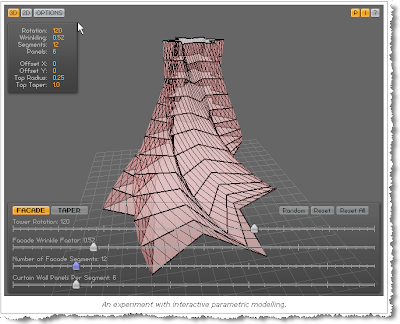
I was bumping around the Buildz site and came across a post talking about Performative Design and can only say: Oh Shit, That could be useful!!!
The next link coming gets you to the place to play with an example, from Andrew Marsh's website; Simple Parametric Modelling Experiment.
More great demos can also be found at Anar+
If you or someone you love is a programmer or wants to be, then I think this is definitely a great road to travel...
I was bumping around the Buildz site and came across a post talking about Performative Design and can only say: Oh Shit, That could be useful!!!The next link coming gets you to the place to play with an example, from Andrew Marsh's website; Simple Parametric Modelling Experiment.
More great demos can also be found at Anar+
If you or someone you love is a programmer or wants to be, then I think this is definitely a great road to travel...
Monday, May 03, 2010
2 Miles in 2010 is 20 in 11: The Revit Import Limitation and more Revit 2011 Known Issue Solutions
Well, 2 miles is now 20 miles... CLICK ME TO SEE THAT and then CLICK HERE for more Revit 2011 Known Issue Solutions (Thanks Harlan!!!)
Hey ADSK,; What about getting it to where there is no import limitation? Like when the Civil datum point is hundreds of miles away??? It does happen... Can't we get this without jumping through hoops??? Maybe one day...THIS PREVIOUS POST had the 2 mile issue with some solutions... -that may still be in play over 20 miles...
Friday, April 30, 2010
Revit 2011 Video Cards -Certified (???) for your profection
Oh where oh where has that (fucking) approved video card list gone?? Oh where oh where can it be... on the ADSK site??? well it's RIGHT HERE ...after all Subscription Rules!!!

Yes the spelling error in the post's title was intentional ...If we can't have fun what's the point???

Yes the spelling error in the post's title was intentional ...If we can't have fun what's the point???
Revit to Revit File Linking: Considerations to Consider(ate)
Another "boots on the ground" document to help transition from a purely Revit mindset to a more IPD methodology, or at least a communicative BIM process. Have fun and make up your own considerations!!!
This R2R Linking document might also want to be placed into your BIM Guidelines book next to THIS ONE!!!
Revit to Revit File Linking
This R2R Linking document might also want to be placed into your BIM Guidelines book next to THIS ONE!!!
Revit to Revit File Linking
Wednesday, April 07, 2010
The Technology Stakes: Right through (or to) the heart...of BIM
Shit; was Laurie's article really 4 years ago!!! In any case it's still quite spot on... if you haven't already, it's a definite Need-To-Read. While your list of items in need of coordination may be larger or smaller than what is listed in the .pdf you (can) get the point.
The article brings me back to the Single Central Database Theory; where all the data for a BIM is stored 'out there' and accessed via any application appropriate for any specific task or user
-and no: OPS and the BIM Storms do not accomplish this, so don't get into that argument right now... unless you want to :-)
...Anyhow... Here's that Single Central Database scenario in a tiny nutshell:
If you need to create pretty pictures for a presentation then use a graphics program and it will be able to access the correct project data for those needs ...need to input a new design? Maybe Revit or any other IFC complaint software for that... need reports and quantities, that data could be extracted by any number of apps... all data saved back and available for all...
Nice Dream... Will that happen??? I don't know... If we (AECO) wake up (and pay a lot of fucking money to develop such a game changing paradigm) it can!!!
Any developers want to work together on this? Contact me if you do!!!
Anyhow:
The embedded article below is From the Laurie Barlow, AIA 'Silos of BIM' posting on the Greensward Civitas Blog ORIGINALLY FOUND HERE!!!. She linked up to it within a LinkedIn Discussion and I thought it worthy of sharing...
aiap037932
Cheers...
The article brings me back to the Single Central Database Theory; where all the data for a BIM is stored 'out there' and accessed via any application appropriate for any specific task or user
-and no: OPS and the BIM Storms do not accomplish this, so don't get into that argument right now... unless you want to :-)
...Anyhow... Here's that Single Central Database scenario in a tiny nutshell:
If you need to create pretty pictures for a presentation then use a graphics program and it will be able to access the correct project data for those needs ...need to input a new design? Maybe Revit or any other IFC complaint software for that... need reports and quantities, that data could be extracted by any number of apps... all data saved back and available for all...
Nice Dream... Will that happen??? I don't know... If we (AECO) wake up (and pay a lot of fucking money to develop such a game changing paradigm) it can!!!
Any developers want to work together on this? Contact me if you do!!!
Anyhow:
The embedded article below is From the Laurie Barlow, AIA 'Silos of BIM' posting on the Greensward Civitas Blog ORIGINALLY FOUND HERE!!!. She linked up to it within a LinkedIn Discussion and I thought it worthy of sharing...
aiap037932
Cheers...
Monday, March 29, 2010
Dream Link: Revit to 3DsMAX
Ever dream of linking Revit to 3DMAX? It's here!!! Well once released...
From the non-sequitur files: "He who rejects change is the architect of decay" -Harold Wilson. Hmmm Architects of Entropy... Perhaps I'm going to use that...
-See R Liucci's (now old ;-)) posting Found Here for a few more 'trans-formative' quotes.
From the non-sequitur files: "He who rejects change is the architect of decay" -Harold Wilson. Hmmm Architects of Entropy... Perhaps I'm going to use that...
-See R Liucci's (now old ;-)) posting Found Here for a few more 'trans-formative' quotes.
Thursday, March 25, 2010
REvit 2011 What's New For You
I debated 2 things for this posting: 1) Posting the Revit 2011 What's New Features myself
2) Titling this blog post: REvit 2011 What's Good For You
Here are the winners:
1) See the links below!!!
2) See the title...
Now for the links to goodness!!!
http://autodesk-revit.blogspot.com/2010/03/whats-new-in-revt-architecture-2011.html
http://redbolts.com/blog/post/2009/05/07/Revit-2011-the-most-significant-release-EVER.aspx
http://designerati.wordpress.com/2010/03/25/new-features-in-revit-architecture-2011-bring-refinement/
http://designerati.wordpress.com/2010/03/25/more-details-on-revit-2011/
http://www.marketwatch.com/story/autodesk-launches-2011-design-software-products-with-enhanced-3d-features-2010-03-25?reflink=MW_news_stmp
http://offers.autodesk.com/10/aecsem/index.php/lp/index/171692/170603?gclid=CO7YvZTe1qACFQYoawodgCoKtQ
http://whatrevitwants.blogspot.com/2010/03/autodesk-product-upgrade-download-page.html
That should be a good start!!!
Cheers, -J
Saturday, February 13, 2010
Central File Transfer Processes
Whether transferring to others or even working from home (see the BONUS!!! section) Central files need extra attention paid when dealing with them: Below is a document I wrote to help... Yes you can print, view fullscreen, etc!!!
File Transfer Whitepaper
Cheers,
-J
File Transfer Whitepaper
Cheers,
-J
Thursday, February 04, 2010
Oh Yes He Did!!! Can You Say Revit and Rhino on your IPhone???
Take that dumb-phone users!!!
I was sitting in on the New York Revit Users Group meeting today (isn't technology great...I never left LA)... and there was one item especially interesting: (This would be the time to click the picture above)... Its an IPhone App to view Revit & Rhino models... I heard talk of this at AU this past December (from other people) and it seems they were beaten to the punch!!!
Ian Keough from Buro Happold Consulting presented this at the fore-mentioned NYC-RUG. Thanks to our worldwide community and technology we can share ideas in a truly global way!; thanks for inviting me James!!!
I was sitting in on the New York Revit Users Group meeting today (isn't technology great...I never left LA)... and there was one item especially interesting: (This would be the time to click the picture above)... Its an IPhone App to view Revit & Rhino models... I heard talk of this at AU this past December (from other people) and it seems they were beaten to the punch!!!
Ian Keough from Buro Happold Consulting presented this at the fore-mentioned NYC-RUG. Thanks to our worldwide community and technology we can share ideas in a truly global way!; thanks for inviting me James!!!
Monday, February 01, 2010
The Man-Cave Killer... I can Hardly Wait!!!
OMFG: BIM will be (more) fun when we all get one of these!!!
I am usually willing to go on and on about a given subject but for this I will simply give you the headline and the link. Until I see one of these in (virtual) person I will hold the gushing (which will be extraordinary, I think!!!)...
Wednesday, January 27, 2010
Hey POV RAY Boy: Still Funny After All These Years
This is funny Blender Boy... No need to say much more. My favorite line may be: We'll be OK we're on contract...
Save(As): your Family Size
First things first: If you want to make Families (in Revit) do not forget to remove all unnecessary items from every Family File created; Purge, etc. before publishing to the World, Office or Project.
No Groups!!! (This works well in Human Families too... we are all individuals ;-))... OK, onto the rest...
While bouncing around AUGI (yeah I know) I found a discussion string recalling Family File sizes and ways to reduce them. RIGHT HERE!!! there are several good tips and the usual differing viewpoints.
One thing for sure: there are ways to keep the Family Sizes to where they want/need to be for any file (and that's as small as possible). Andekan has a good blog post so HERE IS THEIR LINK too.
So, Content Team; do we need to go through all of our new libraries and do this? I hope we have a tool for that!!!
BTW: the link with the "Eagle" photograph above? Well, did that have any unnecessary weight? Plus I like the image.
No Groups!!! (This works well in Human Families too... we are all individuals ;-))... OK, onto the rest...
While bouncing around AUGI (yeah I know) I found a discussion string recalling Family File sizes and ways to reduce them. RIGHT HERE!!! there are several good tips and the usual differing viewpoints.
One thing for sure: there are ways to keep the Family Sizes to where they want/need to be for any file (and that's as small as possible). Andekan has a good blog post so HERE IS THEIR LINK too.
So, Content Team; do we need to go through all of our new libraries and do this? I hope we have a tool for that!!!
BTW: the link with the "Eagle" photograph above? Well, did that have any unnecessary weight? Plus I like the image.
Friday, January 22, 2010
Access Denied: The 2 Mile Denial
Until the Developement team makes Revit correctly accept large enough files we will need to deal with its 2 mile limitation.
Now while it is sometimes true that Bad CAD is the culprit, if we could use Revit for all the purposes we require... to digress I recall that it was (or is) said that Revit was/is 'purpose built' for Architects; Well if that's true I guess we should stop doing Urban Planning projects since many are much more that 2 miles!!!
-anyhow, back to the point of this re-re-posting.
If you run into the 2 mile limits here are a couple of ways to deal with them... Best bet is to fix Revit but until that happens (if ever) the Bad CAD repairs seem to be the way out but really IMO either will do... you decide.
An unknowing Thank You goes out to AUGI members tonyisenhoff and phyllisr at/from EUA for providing the posting: V10I01 Revit Distance Restrictions
Thanks (again) to our Blog-o-verse friend Dave Baldacchino for his take: Getting around the 2 mile limitation when linking a CAD file
Now all that is left is to have Revit eradicate this limitation and we could finally throw these posts and workarounds away...
P.S. Revit; I still love you.
Wednesday, January 20, 2010
Come On Baby Lighter Fire: Living and (being) inspired by the underground
The case of Olivier Kosta-Théfaine... and his lighter!!! (well, his creativity also)...
I am always inspired by individual Artistic expressions and this is great. Olivier takes something that many of us have done to a more limited extent (and perhaps under some external influences) and raised it to a valid option for many Design possibilities.; high end included.
Enjoy the linked article and images!!!
I am always inspired by individual Artistic expressions and this is great. Olivier takes something that many of us have done to a more limited extent (and perhaps under some external influences) and raised it to a valid option for many Design possibilities.; high end included.
Enjoy the linked article and images!!!
Sunday, January 17, 2010
Sometimes we need to revisit the basics...
This is for the users who have used Revit for a while and still ask where to find content. I will refrain from all of the editorialization and just say: "use the 'Google Machine'!!!" plus check back in on the sites you find/ & like from time to time... the World is always changing; remember???
That all said: I am writing a new comparative article encompassing the past 30 to 30,000 years of AEC technology and of course with my unique structure and twisted (yet helpful?) viewpoint(s)... it will either be posted here or published (print and/or web) sometime in early February...
BTW: This is my excuse for not posting a lot lately!!!
Subscribe to:
Posts (Atom)